In earlier tutorials we have focussed on reading information with HealthKit. There are a number of queries that can be used to request information in a variety of ways. In this tutorial we will work on saving information with HealthKit.
Saving data to the health store with HealthKit follows a general procedure which has just 4 steps.
The first step is to find the identifier for the type of data you want to store. For this tutorial we will save body mass. In a later tutorial we will look at saving workouts, and other more complex data types such as step counts where there are more than just 1 reading per day. [Read more…]
 In todays tutorial we will look at the long-running query that is available for HKActivitySummaryQuery. This particular version of the query keeps running in the background and monitors for changes. Each time the health store is updated with new data; either stand, exercise, or active calories; the update handler will be called which will allow you to refresh your views, should you need to.
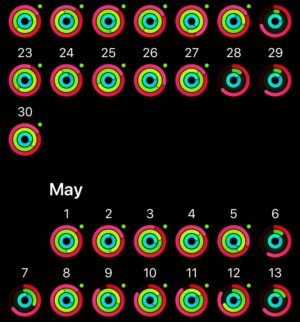 The easiest way to think about this query is to look at the activity ring, or a collection of activity rings as pictured here. Apple Watch owners will be very aware of what each ring represents. This class allows you to fetch the data that builds up this ring, but also pass it to the HKActivityRingView to represent those numbers in a familiar format to Apple Watch users. For those wanting to use the Apple Watch version of the ring, Apple also has made available WKInterfaceActivityRing.